Fundamental Introduction to Web Development

# Networking Fundamentals
# Internet
The Internet is a global network of computers used to exchange data.
It provides access to information, services, and communication across the world.
# Server
A server is a machine that provides services to other programs or devices, known as clients.
Its role is to share data, resources, and distribute workloads.
Types of servers:
- Web servers
- Database servers
- DNS servers
# Web Server
A web server accepts HTTP requests from clients (browsers) and sends back HTTP responses containing HTML pages, images, files, and other resources.
# Domain & IP Address
A domain is a memorable, human-friendly address used to access websites. Without domains, you’d have to remember complex IP addresses.
An IP address is a unique numerical identifier assigned to every device connected to the internet.
It works like a postal address, helping devices find each other and exchange information.
IP addresses are organized hierarchically (country → region → device) to optimize routing speed.
# DNS & DNS Lookup
DNS (Domain Name System) — acts like the internet’s phonebook, translating domain names into IP addresses.
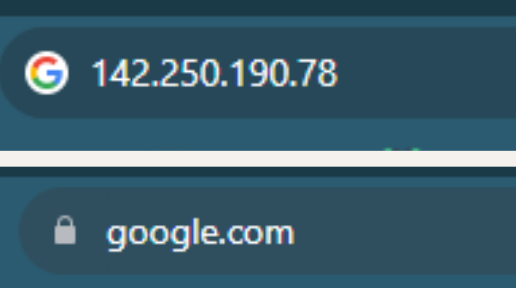
For example, using the IP 142.250.190.78 or the domain google.com will take you to the same website — Google’s homepage.
DNS lookup is the process of finding the IP address of a server using its domain name (e.g., example.com → 93.184.216.34).
# How it works
- DNS Request: The browser sends a request to a DNS server to get the IP address of the domain.
- Caching: Once fetched, the IP address is stored in the browser’s cache to speed up future visits.
- Multiple Hosts: If a webpage loads resources from multiple domains (e.g., fonts, images, or scripts), the browser performs a DNS lookup for each domain.
Real-world example:
If your webpage loads Google Fonts, the browser will perform a DNS lookup not only for your site’s domain but also for fonts.googleapis.com.
# CDN — Content Delivery Network
A CDN is a network of servers distributed globally that stores copies of website content (pages, images, videos) and delivers them from the closest server to the user.
Benefits:
- Faster load times
- Reduced server load
- Better reliability
Real-world example:
Netflix uses CDNs to stream video from a nearby server, so you don’t have to wait for data to travel halfway across the world.
# Browser — Introduction
A browser is software that allows a user to access information on the internet via the World Wide Web.
In modern web development, knowing how browsers operate can make your websites faster, more accessible, and more reliable.
# How the Browser Loads a Web Page
Navigation is the first step in loading a web page.

When you type a URL into the browser's address bar, you’re directing your browser to connect to a specific web server.
The server processes your request and sends a response containing files like HTML, CSS, and JavaScript, along with media such as images and videos. If everything is fine, the server responds with a 200 OK status code.
The first request from a browser to a web server is always a GET request — a common interview question for junior developers.
# Request, Response, Parsing, Rendering
# Request
The browser sends an HTTP/HTTPS GET request to the server for the page’s content.
# Response
The server (or CDN) returns data — HTML, CSS, JS, images — which the browser processes.
# Parsing
Parsing is converting the HTML into a format the browser can understand — the DOM (Document Object Model).
- CSS is parsed into CSSOM (CSS Object Model).
- JavaScript without
asyncordeferstops HTML parsing until the script loads and runs. - Render tree combines DOM + CSSOM for display.
- Non-blocking resources (images, videos) load in parallel.
The browser also builds an Accessibility Tree, which is essential for assistive technologies like screen readers.
# Rendering
Rendering is turning HTML, CSS, and JavaScript into a visual webpage.
- Styles: DOM and CSSOM merge into a render tree of visible elements.
- Layout: Browser calculates size and position (box model: content, padding, border, margin).
- Painting: Browser draws pixels — text, images, colors.
- Interactivity: JavaScript loads, enabling scroll, clicks, and animations.
# TTI — Time To Interactive
TTI (Time To Interactive) measures how long it takes from the first request (starting with DNS lookup) until the page becomes fully interactive.
- Shorter TTI = better user experience.
- Test your site’s TTI with PageSpeed Insights.
# Summary
- Domain & IP: Human-friendly name + unique numeric address for devices.
- DNS Lookup: Translates domain names to IP addresses; caching speeds up repeat visits.
- CDN: Speeds up content delivery using global servers.
- Navigation: Entering a URL sends a GET request; server responds with page files.
- Request/Response: Browser requests data; server returns HTML, CSS, JS, and media.
- Parsing: HTML → DOM, CSS → CSSOM, combined into a render tree.
- Rendering: Calculates styles, layout, and draws the page.
- TTI: Time until a page is fully usable.